The new tab of Google Chrome always bothers me because I don't need a search bar on a blank page since the location bar has the same function. I've written one article about how to change it back but, unfortunately, the way I wrote isn't available anymore.
Now, there's a much easier method to do so.
Friday, April 17, 2015


Find my phone for Android
Is there anytime that you forgot where you've put your phone?
I believe some people, including me, have this problem once in a while. We may have left the phone in the office, or it's just buried under a pile of clothes. For Android users, there is now a easy way to find your phone.
I believe some people, including me, have this problem once in a while. We may have left the phone in the office, or it's just buried under a pile of clothes. For Android users, there is now a easy way to find your phone.
Wednesday, December 24, 2014
It's been so long!
I just found that the latest post on this blog is a year ago. I really should start writing something again. Though most of the articles would be boring because they're about my stupid meaningless life experiences. I still don't know any good topic to start with. Travel log is one of good ideas, I guess, but who cares about traveling Taiwan?
I hope I will post a new one soon...... Finger crossed!
Oh~ Merry Christmas~ I almost forgot! Happy holidays everyone except I don't even have a holiday.
I hope I will post a new one soon...... Finger crossed!
Oh~ Merry Christmas~ I almost forgot! Happy holidays everyone except I don't even have a holiday.
Sunday, July 28, 2013
Go back to the old new tab page of Google Chrome
NOTE:
This method isn't available anymore. Try the new way to do so.
I usually use Firefox as my default browser, but I use Google Chrome mainly for Google services like Gmail and Google drive. Therefore, I feel convenience that many online applications can be shown as an app icon in the new tab page of Google Chrome.
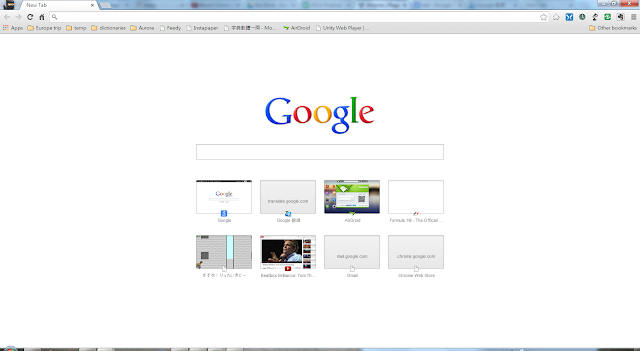


This method isn't available anymore. Try the new way to do so.
I usually use Firefox as my default browser, but I use Google Chrome mainly for Google services like Gmail and Google drive. Therefore, I feel convenience that many online applications can be shown as an app icon in the new tab page of Google Chrome.

Unfortunately, after I've updated Google Chrome to version 29, the new tab page is changed. We could find a search bar in the middle of the page and few recently viewed sites showing below. Notably, the shortcut of applications is gone, instead, an app bookmark is shown on the bookmark tool bar, which links to a page (chrome://apps) that shows the applications we've installed just like the old new tab page.

Some people may feel okay because they don't have many applications and it seems to integrate with Google Now (I don't see Google Now running on my computer, and I don't know why) which could be very useful. However, for me, I prefer the old one. So that's what I do to get my old new tab page back!

- Enter "chrome://flags/" in location bar of Google Chrome
- Press "F3" or "Ctrl + F" to search "Enable Instant Extended API "
- Disable the option and click "Relaunch Now" button
Finally, we can get our new tab page back!

Saturday, April 13, 2013
Tune thouchpad for Linux Mint

The simplest way, which found on the google, is to create a script:
Save it and run it every time start up desktop.synclient TapButton2=2 synclient TapButton3=3
Or you can modify/usr/share/X11/xorg.conf.d/50-synaptics.conf:
Section "InputClass"
    Identifier "touchpad catchall"
    MatchIsTouchpad "on"
    MatchDevicePath "/dev/input/event*"
    Driver "synaptics"
    Option "VertTwoFingerScroll" "on"
    Option "HorizTwoFingerScroll" "on"
    Option "CircularScrolling" "off"
    Option "CricularTrigger" "0"
    Option "TapButton1" "1"
    Option "TapButton2" "2"
    Option "TapButton3" "3"
EndSection
I'm lazy to do that.
Subscribe to:
Posts (Atom)